
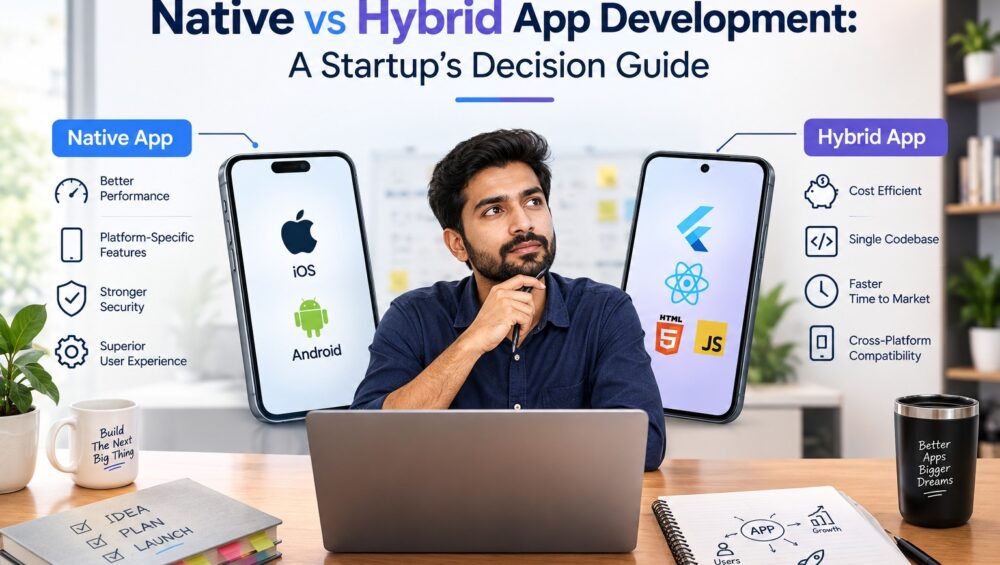
If you’re building your first app and trying to decide between native and hybrid development, you’re not alone. This is one of the first big technical decisions every startup founder faces, and getting it right early can save you months of rework later.
The short version: native gives you the best performance and deepest access to your phone’s hardware, while hybrid gets you to market faster and cheaper with one shared codebase. But which one actually fits your startup depends on your budget, your timeline, and what your app needs to do.
Let’s break down exactly how to make that call.
What’s the Difference?
Native app development means building separate versions of your app for iOS and Android, using each platform’s own language—Swift for iOS, Java or Kotlin for Android. Each version is written specifically for its platform, which is why native apps tend to feel the smoothest and run the fastest. You get full access to device features like the camera, GPS, biometrics, and push notifications without any workarounds.
Hybrid app development uses frameworks like React Native or Flutter to write one codebase that runs on both iOS and Android. Instead of building two separate apps, your team builds one, and it compiles to work on both platforms. This is essentially what people mean by cross-platform app development—one build, two markets.
Neither approach is universally “better.” They’re built for different priorities, and comparing React Native vs. Swift really comes down to what your startup needs right now, not which technology is objectively superior.
Pros and Cons of Native (Swift, Java)
Pros:
- Best possible performance and the smoothest animations
- Full, unrestricted access to device hardware and OS-level features
- More predictable scaling as your user base and feature set grow
- Fewer compatibility issues since you’re not relying on a translation layer
Cons:
- You’re building and maintaining two separate codebases
- Development typically costs more, since every feature is built and tested twice
- Longer time to launch, especially if you want both platforms live simultaneously
- Requires developers skilled in two different languages, which can complicate hiring
Native makes the most sense when your app leans heavily on performance or hardware—think mobile games, AR/VR experiences, or fitness apps built around sensor data. If you already know you’re scaling fast and need rock-solid reliability under heavy load, native reduces the risk of hitting a wall later.
Pros and Cons of Hybrid (React Native, Flutter)
Pros:
- One codebase for both iOS and Android, which lowers cost significantly
- Faster development and faster time to market
- Easier to push updates and bug fixes, since you’re not maintaining two builds
- A smaller, more focused team is needed to get started
Cons:
- Slightly lower performance on animation-heavy or graphics-intensive apps
- Limited access to certain cutting-edge device features until frameworks catch up
- Can hit scaling friction later, sometimes requiring a partial native rewrite
For most early-stage founders exploring hybrid app development for startups, this is where the math tends to land. If your goal is to validate an idea and learn from real users fast, hybrid gets you there with meaningfully less spend. Modern frameworks like Flutter and React Native have also closed much of the performance gap that used to make hybrid feel like a compromise—unless your app is doing something genuinely hardware-intensive, most users won’t notice a real difference. If you’re weighing frameworks against your specific feature list, it helps to see what mobile application development actually involves day to day, since the right choice depends heavily on team expertise and app complexity.
Decision Framework by Use Case
Rather than picking a side in the abstract, run your app idea through these questions:
- Are you validating an idea or scaling a proven one? Validating favors hybrid. Scaling favors native.
- Does your app need deep hardware access? Heavy camera, sensor, or AR/VR use favors native.
- What’s your runway? Tighter budgets and timelines favor hybrid.
- Do you need both platforms live at launch? If yes, hybrid gets you there faster and cheaper.
- Is animation or performance central to the user experience? If yes, lean native.
Here’s how that plays out by app type:
- Marketplace or booking app: Hybrid, especially pre-funding
- Fintech app with biometric login: Leans native for security and hardware trust
- Content or news app: Hybrid is almost always sufficient
- Fitness app with wearable integration: Leans native
- Internal business tool or dashboard app: Hybrid, since performance demands are low
Most startups answer these questions in a way that points toward hybrid for their first release, then revisit native later once they’ve proven demand and raised the capital to support it.
Real Case Study Example
Consider a typical early-stage logistics startup building an app to let drivers track deliveries and update statuses in real time. The founding team had two priorities: launch within a tight runway and support both iOS and Android from day one, since their driver base used a mix of both.
Going native would have meant building and testing two separate apps before they’d validated whether drivers would even adopt the tool. Instead, a hybrid build using a single shared codebase let the team launch on both platforms in a fraction of the time, gather real usage data, and iterate based on actual driver feedback rather than assumptions.
This is a common pattern across founder-stage builds: hybrid isn’t a lesser version of the “real” app; it’s the version that gets tested against reality faster—which is usually more valuable than a marginal performance edge nobody asked for yet.
Frequently Asked Questions
Is hybrid app development good enough for a startup MVP?
Yes, for most startups. Hybrid frameworks like Flutter and React Native deliver strong performance for the vast majority of business apps, and the cost and speed advantages usually outweigh the small performance tradeoff at the MVP stage.
React Native vs. Swift—Which Should I Learn or Hire First?
If you’re building for both iOS and Android on a startup budget, React Native gets you there faster with one team. Swift makes sense only if you’re committed to iOS-first with deep native features from day one.
Can I switch from hybrid to native later?
Yes, though it typically means a partial or full rebuild of your app’s core. Many startups launch hybrid to validate their idea, then transition specific performance-heavy features to native once they’ve secured funding and proven demand.
Which is cheaper: native or hybrid app development?
Hybrid is almost always cheaper upfront since you’re building one codebase instead of two. Native can become more cost-effective long-term if you need extensive customization or hit performance issues that would otherwise require an expensive hybrid-to-native migration.
What’s the biggest mistake startups make with this decision?
Choosing native too early. Many founders assume “native” means “more professional,” but if you’re still validating your idea, the extra cost and timeline rarely pay off before you know whether users actually want your product.
Conclusion
There’s no universally correct answer to native vs. hybrid app development—only the right answer for where your startup is right now. If you’re validating an idea and need to move fast on a tight budget, hybrid is usually the smarter first step. If your product depends on deep hardware integration or you’re already scaling with proven demand, Native’s higher upfront cost tends to pay off. The team at Precisio Technologies works through exactly this decision with founders every week, matching the framework to the product instead of defaulting to one approach. You can browse a few case studies of startups that made this call successfully.
Talk to our mobile app development team—walk through your app’s specific requirements with people who’ve built both native and hybrid products, and leave with a clear recommendation instead of a guess.